


The best TV stand isn’t chosen by the number on your television’s box. It’s chosen for the whole viewing setup. If you’re wondering how to choose a TV stand, look beyond screen size: the television’s actual width, the position of its feet or base, your connected devices and the space around it all matter. A stand can look right in a photograph but feel awkward in the room if it’s too high, too narrow or short on useful storage.
You’ll need to balance comfortable viewing with room for consoles and accessories, easy cable access and a finish that suits your furniture. This guide explains how to measure your television and available space, choose a practical width and height, plan for devices and storage, and find a style that suits your living room, bedroom or snug. The aim is a setup that fits well and works for everyday life.
Key Takeaways
- Choose a stand for your full viewing setup, considering the room layout, seating position and how you watch day to day.
- Measure the television’s full width and depth, its base and the available space before comparing stand dimensions.
- Match the stand format and storage to your room shape, equipment and how easily you need to reach devices.
- Plan placement around sightlines, walkways, window glare and seating angles for a more comfortable setup.
- Check the essential fit requirements first, then weigh up style to make choosing a TV stand simpler and more confident.
How to Choose a TV Stand That Fits Your Room and Routine
Screen size is only one part of the decision. Two TVs with the same diagonal measurement can sit differently in a room, and the right stand also depends on where you watch, what needs to sit nearby and how you use the space. A relaxed living room, a shared family space and a bedroom each call for a different balance of viewing comfort, storage and visual calm.
Start with the room, not a favourite finish. Note the main seating position, the TV’s likely location, nearby windows and the routes people regularly walk through. If you’re rearranging the space, consider how the stand will sit alongside your living-room furniture, rather than treating it as a separate piece. These details help narrow your options before you start comparing colours and shapes.
Which room and viewing habits should shape your choice?
Think about who watches and how. Is the television used most evenings by people settled on one sofa, or does the room serve several purposes, with viewers moving between seats? A consistent seating position makes it easier to plan the setup. In a multipurpose room, keep the screen and stand in proportion and make sure they don’t obstruct other activities.
Look at the room from seated eye level and consider the natural light at the times you usually watch. A window opposite the screen may cause distracting reflections, while a position that works for one chair could feel uncomfortable from another. Walkways matter too: keep usual routes clear and account for doors, side tables and other furniture before choosing a location.
What should you decide before comparing TV stands?
Separate your non-negotiables from the details you simply prefer. Must-haves are the practical conditions the stand needs to meet; style preferences help you choose between options that already fit. This makes it easier to avoid being won over by a look that doesn’t suit your routine.
Make a short room-and-use checklist before browsing:
- Room: Note its purpose, available floor space, windows and clear walking routes.
- Television: Record its full external dimensions and how its base sits, ready to compare them with stand measurements.
- Devices: List consoles, set-top boxes, speakers, remotes and accessories that need to be close by.
- Storage: Decide what should be easy to reach, what you’d rather keep out of sight and whether you want space for display items.
- Appearance: Write down preferred colours, finishes and shapes separately from the fit requirements.
A household with several devices may prioritise accessible space, while someone who wants a quieter-looking room may prefer storage that keeps accessories less visible. Neither approach is automatically better. Consider which one supports the way you use the room. Once your priorities are clear, the decision becomes more considered: start with everyday needs, then choose a style that suits the character of your space.
How to Measure TV Stand Width and Height Correctly
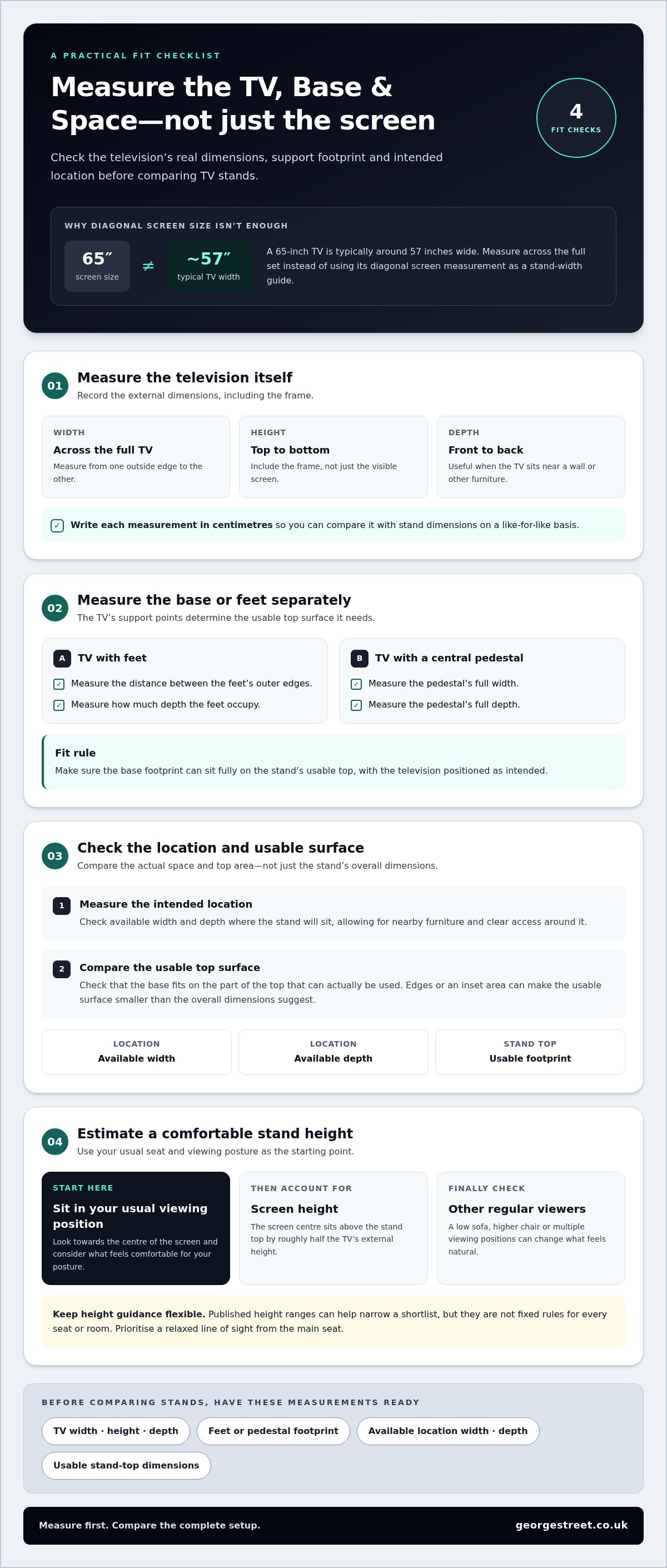
Accurate measurements show whether a promising option will work in practice. A television’s advertised screen size is measured diagonally, from one corner of the display to the opposite corner. It doesn’t tell you the full width of the television, how far apart its feet sit or how much depth its base takes up. Measure the television and its support points before comparing stand dimensions.
Work through these checks in order, and note each measurement in centimetres so you can compare like with like:
- Measure the television itself. Record its full external width, height and depth, including the frame rather than just the visible screen. A 65-inch TV is typically around 57 inches wide, illustrating why diagonal screen size isn’t a substitute for measuring across the set.
- Measure the base or feet. Note the distance between the outer edges of the feet and the depth they occupy. For a central pedestal, measure its full width and depth instead.
- Measure the intended location. Check the available width and depth where the stand will sit, allowing for nearby furniture and clear access around it.
- Compare the usable surfaces. Make sure the base footprint can sit fully on the stand’s top, with the television positioned as intended. Use the actual usable surface dimensions, not the overall dimensions if the top has edges or an inset area.
How do you measure a TV and its base?
Use a tape measure to record the TV’s outer dimensions, then measure the base separately. The feet may sit close to the edges or nearer the centre; either way, the stand’s usable top must accommodate their footprint securely. The television’s depth matters too, particularly if the screen will sit close to a wall or other furniture.
Check the stand’s measurements carefully. A top that looks wide enough may not offer enough depth or usable space for the feet. Treat general width guidance as a starting point, not a substitute for comparing the television base with the stand.
How do you find a comfortable stand height?
Sit in your usual viewing position and look towards the centre of the screen. Consider where that centre feels comfortable for your posture, then account for the television’s height when estimating the stand height: the screen centre will sit above the top surface by roughly half the screen’s external height. This gives you a useful starting point for comparing options.
Published height ranges can help narrow a shortlist, but they aren’t fixed rules for every seat or room. A low sofa, a higher chair or viewing from more than one position can change what feels natural. Prioritise a relaxed line of sight from the main seat, then check whether other regular viewers can watch comfortably too.
Taking these measurements with you makes it easier to compare furniture and talk through practical fit with an experienced adviser. Let the measurements lead, then consider appearance once you’ve accounted for the television, base and viewing position.
Which TV Stand Type, Storage and Support Suit Your Setup?
The right format depends on your room layout and what the television setup needs to accommodate. A long, low console may suit a broad wall and a central seating position; a corner-friendly shape can make use of an awkward angle. Open shelves keep devices visible and within reach, while enclosed storage creates a more contained look. Compare each option with your room and equipment rather than assuming one style works for every home.
How do common TV stand styles differ?
Use this comparison to narrow the options. Think about where the stand will sit, how you move through the room and whether you want equipment on show or out of sight. A wall-mounted screen is another option, though it shifts the support question from the stand to the wall and mounting system.
| Format | May suit | Consider |
|---|---|---|
| Low console | A main wall with enough width and a settled viewing position. | Its surface must accommodate the TV base, with room for any equipment placed beside it. |
| Corner design | A room where a corner makes better use of the available floor space. | Check the shape and depth against the corner, walkways and viewing angle from your seats. |
| Open shelving | Setups where devices need to stay visible and easy to reach. | Check shelf dimensions, cable access and room for airflow around equipment. |
| Enclosed storage | Rooms where a tidier, less visible arrangement is a priority. | Make sure doors or panels won’t obstruct remote controls, device access or ventilation. |
What storage and compatibility details deserve attention?
Match each shelf and opening to the equipment you own. Measure devices, including their cables, and consider how you’ll reach buttons or connect accessories after they’re in place. Consoles and AV receivers need airflow; allow the clearance their manufacturers recommend. If you’re comparing a wall-mounted setup, check the TV’s VESA pattern, the mount’s matching dimensions and its stated weight capacity.
Support comes first. Compare the television’s weight and base footprint with the stand’s stated limits and usable top surface. The TV should sit as intended, with its base fully supported. Don’t assume a stand is suitable simply because it looks wide enough. Follow the television and stand manufacturers’ guidance, including any instructions for securing the setup. No format is automatically safer for every television.
A household with several devices may favour accessible shelving, while a shared living room may benefit from storage that keeps accessories less prominent. That’s the heart of how to choose a TV stand: balance the room’s shape, equipment access and the television’s support needs, then choose a format that makes everyday use straightforward.
How to Plan TV Stand Placement, Cables and Everyday Access
A position can look perfect on a floor plan and feel wrong once the room is in use. Before settling on a stand, test the screen’s location, the view from your seats and the paths people take through the room. Then map cables and connected equipment around that position. This helps you choose storage that works with the setup, rather than making the setup fit an inconvenient stand.
How can you test a TV stand position before buying?
Use removable tape to mark the stand’s footprint, then mark where the screen centre would sit. Sit in your main viewing place and check the view; repeat from other seats used regularly. Consider daylight at the times you usually watch, since a window opposite or beside the screen may create glare. Adjust the proposed location before settling on a layout.
Walk through the room as you normally would. Check that the marked footprint doesn’t narrow a route between doors, seating or other furniture, and leave space to reach nearby items. A corner may free up a wall, but the angle should still work from your usual seats. Choose a position that balances sightlines, light and everyday movement.
How should you plan cables and connected equipment?
List the connections your setup uses, including power, picture and audio, then trace where each cable needs to run. Compare those routes with the stand’s cable openings and shelf positions. Keep device controls and connection points reachable, so plugging in or adjusting equipment doesn’t require shifting the television or emptying a compartment.
Check the device makers’ instructions for ventilation and connection requirements. Leave the recommended clearance around equipment, and avoid trapping cables tightly behind devices. If you use a soundbar, include its position in your plan and make sure it won’t block the screen or a remote-control signal.
Use this quick placement sequence before choosing a final layout:
- Mark the screen position. Tape out the stand footprint and estimate the screen centre.
- Check sightlines. View the marks from the main seat and other regular viewing positions.
- Assess walkways. Move through the room and confirm everyday routes remain clear.
- Trace the connections. Note cable paths, sockets and the access needed for each device.
- Review equipment access. Make sure controls, ports and ventilation clearances remain practical.
This rehearsal can reveal awkward angles, glare and cable routes while the arrangement is still easy to change. It also helps you decide whether open shelves or enclosed storage suit the equipment and access you need. A considered position should feel natural from your seat, not simply look balanced from across the room.
With the position and connections mapped out, compare furniture options against the room’s actual needs. Keep your notes close and choose an arrangement that makes viewing, movement and everyday access straightforward.
How to Make a Confident TV Stand Shortlist
A strong shortlist starts with fit, not finish. Use your measurements and room notes to rule out options that won’t support the television, suit the viewing position or accommodate the equipment. Then compare storage and appearance. This makes how to choose a TV stand less about guesswork and more about finding a piece that works in your room.
What should your final TV stand checklist include?
Before weighing up colours and shapes, make sure each option passes the practical checks. Keep your notes beside you as you compare:
- Room fit: Does the stand fit its intended footprint without crowding walkways or nearby furniture?
- Television support: Does the usable top suit the TV base, and does the stand’s guidance account for the television’s support needs?
- Viewing comfort: Does the height work from the main seat and other regular viewing positions?
- Everyday setup: Is there suitable space for your devices, with useful access to cables, controls and connections?
- Room character: Does the finish and shape sit comfortably alongside existing furniture and the room’s proportions?
Treat the first four as pass-or-fail requirements. A finish you love can’t make up for a base that doesn’t fit or equipment that’s awkward to use. Once the essentials are satisfied, let colour, shape and visual balance guide the final choice.
How can expert furniture advice help with the wider room?
A TV stand is one part of a living room, so consider how its scale and finish relate to the seating and other pieces around it. George Street Furnishers offers expert, pressure-free advice to help you think through the room as a whole rather than judging one item in isolation. Exploring a broad furniture range can also give useful context if you’re planning more than one change to the space.
What is the easiest next step once you have a shortlist?
Compare each option against your checklist, using the same measurements and practical requirements each time. If two choices both fit, consider which offers the storage you’ll use and feels most at home in the room. Seeing furniture in person can make scale, finish and proportion easier to picture, especially when you’re coordinating a few pieces. You can also explore home and furniture advice as you plan the space.
George Street Furnishers’ large showroom brings together furniture for different rooms, with experienced advice in a relaxed, pressure-free setting. Take your notes along and use them to guide an unhurried conversation about how your furniture choices can work together.
Make Your Living Room Feel More Like Home
A well-chosen TV stand does more than hold a screen. It helps the room feel settled, making space for shared evenings, favourite programmes and quiet pauses. With your measurements and priorities in hand, you’re ready to choose with greater confidence. Let the fit guide you, then choose a look that feels naturally yours.
George Street Furnishers brings 75 years of family-run experience across three generations, a broad furniture selection and expert, pressure-free advice. If you’re thinking about how to choose a TV stand as part of your whole living space, explore furniture that can help shape the room around it.
Explore the furniture range and take the next step towards a living room that feels comfortable and considered.
Frequently Asked Questions
Can I put a soundbar inside a TV stand?
Yes, if the soundbar fits the opening with room for its controls and connections to remain accessible. Measure its width, height and depth, then compare those dimensions with the clear space inside the compartment, not just the outside measurements. Placing a soundbar inside furniture may affect the direction or quality of its sound. Follow the soundbar maker’s guidance on placement and avoid enclosing it if the instructions advise against it.
What happens if my television feet do not fit on the TV stand?
Don’t balance the feet partly over an edge or assume the screen’s width tells you the base footprint. Check the distance between the feet and how much depth they occupy, then compare both measurements with the stand’s usable top surface. If they don’t fit fully, choose a stand with a suitable surface or consider a compatible mount instead. For mounting, follow the television and mount instructions for compatibility and support.
Can I use a TV stand with a wall-mounted television?
Yes. A stand beneath a wall-mounted screen can provide a home for connected devices, remotes or decorative pieces, even though it isn’t supporting the television. Plan where cables will run and keep equipment accessible for everyday use. The stand’s height doesn’t determine where the screen should be mounted; choose the screen position for comfortable viewing and follow the relevant television and mounting product instructions.
How much space should I leave behind a TV stand for cables?
There’s no single clearance that suits every setup; the space depends on the stand, plug shapes and where the connections sit. Measure the largest plugs, including how far they project, and allow cables to bend without being crushed against a wall. Leave enough access to connect or disconnect devices without forcing the stand out of position. Follow equipment makers’ instructions for any specific clearance requirements.
Is it okay to place a TV stand in front of a radiator?
It depends on the room layout, radiator and furniture materials, so there’s no universal safe distance to recommend. Avoid blocking the radiator or restricting the movement of heat around the room, and follow the guidance provided for both the furniture and heating equipment. If the stand would obstruct the radiator, its controls or access for maintenance, consider another position that keeps the area clear.
What should I measure to make sure a TV stand can get into my room?
Measure the delivery route as well as the final space. Check doorway and hallway widths, turns, stair access and any tight points, then compare them with the packaged or assembled dimensions provided for the specific item. Remember to account for door handles, other obstacles and the room needed to manoeuvre safely. A stand may fit its intended spot but still be difficult to carry through the route to reach it.