


A noticeboard can bring order to a home office, but it can’t create a productive workspace on its own. To understand how to create a productive workspace at home, start with a dedicated work area, place your desk near natural light where possible, and choose a supportive chair. Keep your screen at eye level and give work essentials a home, so the space is ready for focused work.
It’s easy to assume that a pinboard, tidy desk or stylish corner will solve everything. Each can help, but productivity depends on how the whole space works together: comfort, light, organisation and clear boundaries between work and home life.
This guide explains how to shape a practical workspace around the room you have, whether that’s a separate study or a quiet corner. You’ll learn where a noticeboard fits, how to arrange your desk and seating, and how storage and personal touches can make the space welcoming without distracting from work.
Key Takeaways
- Place your desk where daylight can reach it, then use focused task lighting to brighten your work surface when needed.
- Choose a chair that supports your back, thighs and arms, and position your monitor at eye level for a more comfortable setup.
- Give work a defined place and routine, using storage to clear papers and accessories away when the working day ends.
- Personalise the space with a few considered touches, such as art or plants, while keeping the desk clear enough to concentrate.
- A noticeboard can keep reminders visible; pair it with a dedicated work area and clear boundaries to make your workspace easier to use.
1. Using natural light and task lighting
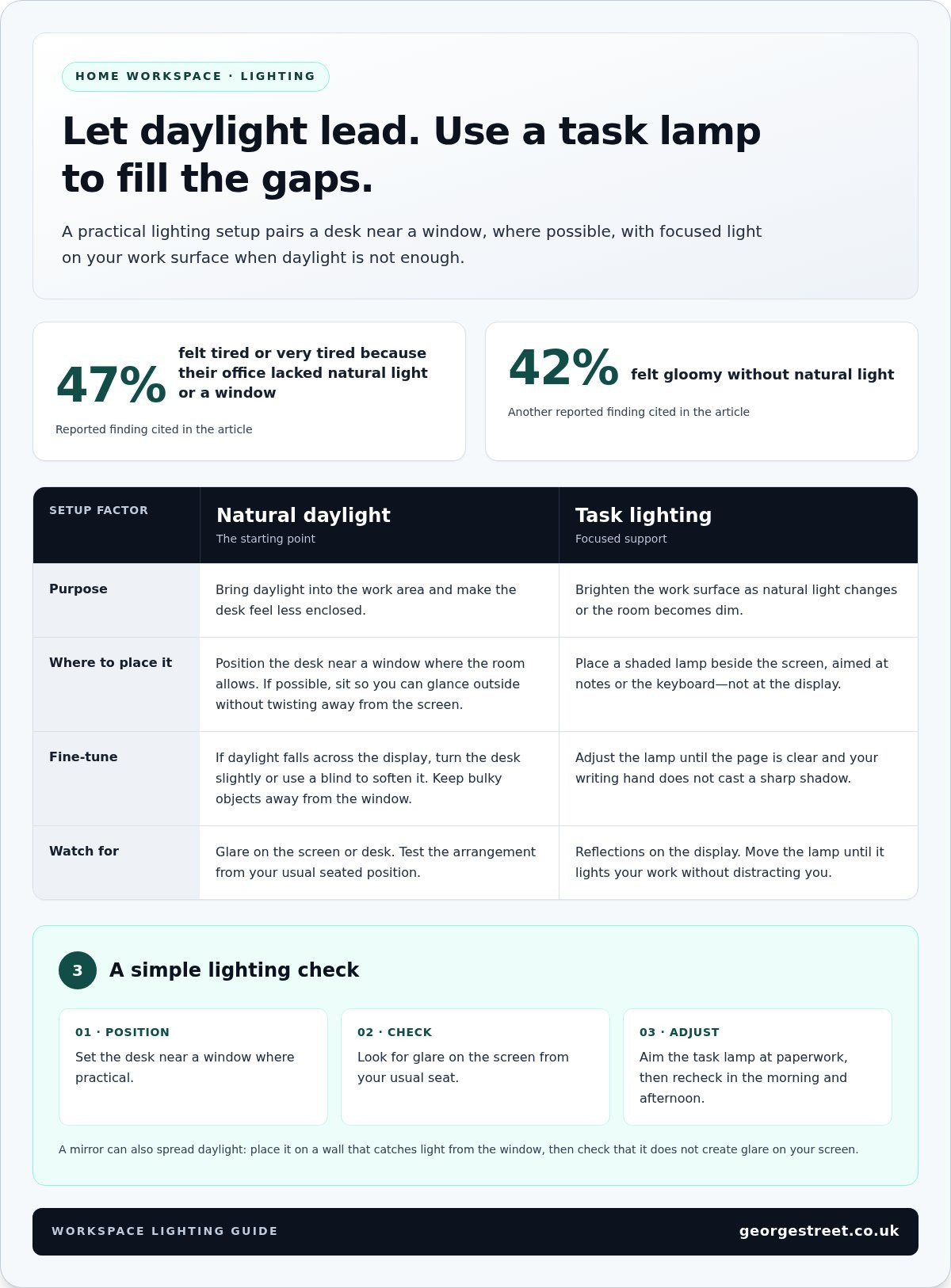
Start with the window: position your desk nearby when the room allows, so daylight reaches your work area. In reported findings, 47% of employees felt tired or very tired because their office lacked natural light or a window. Another reported finding put the share who felt gloomy without natural light at 42%. These figures underline why daylight deserves a place in your workspace plan, while leaving room to adapt the layout to your home.
A window view can make a desk feel less enclosed. If possible, position your chair so you can glance outside without twisting away from the screen. A view of trees, a garden or the sky offers a visual pause between tasks. If the window faces a busy street, angle the desk towards the light and use a plant or simple screen to soften distractions without blocking daylight.
Mirrors can help spread light through a darker room. Place one on a wall that catches daylight from the window, rather than directly opposite your screen. This can reflect light deeper into the space without creating strong reflections in your eyes or on the display. Test the position from your usual working height, then adjust the mirror if sunlight causes glare on the desk.
Natural light changes throughout the day, so combine it with artificial lighting. Place a task lamp beside the screen, aimed at your notes or keyboard rather than the display. A shaded lamp directs light onto the work surface. Adjust its height until the page is clear and your writing hand doesn’t cast a sharp shadow. In the evening, switch on the lamp before the room becomes dim, rather than relying on the screen as your only light source.
Check the setup from your usual seated position. Open the documents you work with, look at the screen, then move the lamp to eliminate distracting reflections. If daylight falls directly across the display, turn the desk slightly or use a blind to soften the light. Keep the window clear of bulky objects and move smaller items away from the brightest part of the sill.
Refine the lighting in a few simple steps: set the desk near the window, check the screen for glare, then position the task lamp over your paperwork. Recheck the setup in the morning and afternoon, as the sun’s angle changes. A lamp that works beside a west-facing window at midday may need adjusting later. Small changes help the lighting support your work instead of competing with it.
Let the window help guide your choice of desk position. If possible, place the desk near it to make use of natural light, before considering a spot deeper in the room. Keep the arrangement practical too: choose a place where you can work comfortably and make good use of the daylight available.
If the room has no obvious position, choose the nearest workable spot rather than forcing a layout that gets in your way. The aim is to let daylight support your work while keeping the desk practical for everyday tasks.
2. Choosing supportive chairs and ergonomic monitors
Your chair and screen should suit the way you work, not just fit the room. An ergonomic chair is claimed to increase productivity by 15%-20%, and someone working at a home desk may spend almost half of the day sitting. Look for support beneath your back, thighs and arms, then adjust the seat so your shoulders can relax. Position the monitor at eye level to avoid leaning forward to read.
No single desk or chair size suits everyone. Choose a desk with enough depth and width for your screen, keyboard and regular work materials, while leaving room for your legs. The chair should slide beneath it and let your feet rest steadily. Try the setup together: when typing, your elbows should stay near your sides without your shoulders lifting.
Small adjustments can make a noticeable difference. If the screen is too low, a stable riser can bring it closer to eye level. If it’s too far away, move it before leaning forward becomes a habit. Centre your keyboard with the display and place the mouse beside it. For laptop work, a separate keyboard and mouse let you raise the screen without raising your hands.
Choose finishes that support concentration rather than compete with it. A rug can soften the floor beneath your chair, but make sure its edges won’t catch the chair’s wheels or feet. Wallpaper and wall art can add character; choose a pattern or image that feels restful during long periods at your desk. Position the desk lamp so its base doesn’t take up space needed for writing or using a mouse.
Flexible furniture helps a workspace fit into a shared room. A compact desk or multipurpose table can work if the chair moves freely and essential equipment has a place nearby. A small drawer unit can hold papers and stationery, keeping the work surface clear. Test how each piece fits in the room rather than judging it on its own.
Give the workstation a defined footprint, even in a multipurpose room. Align the desk with a wall or existing furniture, then keep the chair, screen and work tools within that zone. This makes it easier to begin a task without rearranging the room. Before settling on the layout, sit down and try a typical task, such as typing while referring to a document. Adjust things if you need to twist, reach or move the chair around obstacles.
There are no universal desk or chair measurements. Choose a desk with enough width and depth for your screen, keyboard and work materials, while leaving room for your legs. The chair should fit beneath it and let you sit with your feet supported and elbows near your sides as you type.
3. Designating a work area and setting boundaries
Reduce noise and distractions by choosing a spot away from household traffic, then agree on clear signals with others at home. A closed door can help. In a shared room, a screen or bookcase can mark the boundary and make the work area feel separate.
Give work a defined beginning and end. Start by placing your laptop, notebook and daily supplies in one area, then keep personal items elsewhere. At the end of the working day, put papers and office accessories into boxes or drawers. This simple reset clears the surface for other uses and makes it easier to return to work the next day. Being organised is claimed to save 60 minutes a day, so build the habit around the items you reach for most.
Clutter often builds up when items have no designated place. Sort work materials into practical groups, such as active tasks, reference papers and stationery. Keep current documents within reach and store completed papers separately. Use a tray for incoming items and a folder for papers that need attention. Avoid stacking unrelated documents together, where important notes can disappear beneath less urgent work.
Make the boundary visible as well as practical. In a bedroom, a desk beside a wall can separate work from the bed; in a living room, a small rug or storage unit can define the work zone. Place a calendar or noticeboard where you can see it while seated, and reserve it for deadlines and reminders. A board crowded with unrelated notes can become another visual distraction.
Room design may also shape how a space feels during focused tasks. A classroom design study reported that participants in rooms with lower ceilings scored 20% better on tests requiring focused attention and logical thinking. Related research describes 10-foot ceilings as associated with abstract thinking, and 8-foot ceilings with more concrete, focused processing. These findings concern room design, not a guarantee of performance at home. Use the height you have, and make the work area feel contained with a desk lamp, a defined wall section or a screen.
Set household expectations around your work routine. Tell others when you need quiet and use a consistent visual cue, such as closing the study door or placing a notebook on the desk. If noise carries through the home, move away from televisions, kitchen appliances and busy walkways. Keep your chair and essential supplies close, so leaving the work zone isn’t the default response to every small interruption.
Include the computer monitor in your final check of the work area. Position it at eye level to help reduce neck and back pain associated with poor posture. Make sure the screen is easy to view, rather than leaving it in a position that contributes to poor posture. Check the monitor’s position whenever you rearrange the work surface.
4. Personalising the workspace
Personal details can make a work area feel like yours, not like a spare corner borrowed from another room. In an experiment by University of Exeter organisational psychologists, people in cubicles with art and plants were 15% more productive than those in bare cubicles. Begin with one framed print, a photograph or a small plant, then notice whether each addition makes the space feel more inviting or more crowded.
Choice matters, too. In a workplace experiment, people who could choose where to place art and plants were 32% more productive than people in bare environments. Bring that sense of agency into your home setup: decide what belongs within sight, and place it where it feels intentional. A family photograph might sit beside the monitor, while a favourite print could hang opposite the desk rather than directly behind the screen.
Plants add a living touch without taking over the room. A small succulent can sit on a shelf or windowsill, leaving the desk clear for work. These plants generally need watering every few weeks or so. If children or pets share your workspace, choose a stable spot away from elbows, cables and frequently used items.
Colour can shape a room’s atmosphere, so introduce it thoughtfully. Researchers found that green exposure improved performance on creativity tasks compared with white, grey, red or blue. Across four experiments, participants exposed to green showed more flexible and inventive thinking. Try a green notebook, desk accessory or small artwork first; a modest accent is easier to change than repainting an entire room.
Make personal touches useful as well as expressive. A noticeboard can hold a short weekly plan, while a small tray can gather the objects you use each morning. Keep the board separate from unrelated household reminders so work notes are easy to scan. Choose a few meaningful pieces rather than filling every wall and surface; visual space gives each object room to stand out.
Consider how the workspace looks when work is finished. In a shared living room, a basket can hold notebooks and small accessories, while a fabric screen can separate the desk from the rest of the room. Keep displayed items easy to move or store, so the area can return to its other purpose. A photograph, plant and carefully chosen colour can add character without competing with the task at hand.
5. Creating a dedicated home workspace
A dedicated workspace doesn’t need a separate room. A practical starting point for how to create a productive workspace at home is to give work one dependable place, with a clear purpose and consistent setup. Choose a corner with enough room for your desk, chair and daily essentials. In a shared living room, place the desk beside a wall or bookcase, away from the main route between the kitchen and sofa. This makes the area easier to use without taking over the whole room.
In the UK, there’s no single standard cost for a basic home office setup. The total depends on what you already own, which furniture you need, and whether the room needs extra storage or lighting. Start with the essentials: a suitable desk, supportive chair and the equipment your work requires. Reuse a table or lamp if it works comfortably, then add items only when a specific need becomes clear.
Measure the available space before moving furniture. Mark the desk’s footprint with paper or removable tape, then check that drawers, doors and walkways remain accessible. Sit in the proposed position and see whether you can reach your keyboard, notebook and charger without stretching. In a small bedroom, a compact desk against a clear wall may work better than placing it beside the bed, where work can blur into rest.
Give the work area a clear beginning and end. Keep work tools together in a tray, drawer or box, and put them away when the day is over. If the desk shares a room with family life, a folding screen or equipment basket can help separate the workspace. A noticeboard near the desk can hold current deadlines, while household messages stay elsewhere. The distinction is practical: work has a place, and so does everything outside it.
Adapt the setup to your routine. If you alternate between video calls and focused writing, leave room for a notebook and position the screen away from a busy doorway. If others use the room, choose furniture that can be moved or cleared without disrupting their needs. Test the arrangement through an ordinary workday, noting where clutter builds up or tasks feel awkward. Adjust the layout in response, rather than adding furniture out of habit.
If you’re considering how to create a productive workspace at home, think of it as a repeatable arrangement, not a perfect room. Choose one defined area, equip it for your actual tasks, and create a simple routine for putting work materials away. This makes a spare corner useful while preserving the room’s other purpose.
George Street Furnishers: Sofas
George Street Furnishers can help you create a comfortable living space around your home office, particularly when work and relaxation share a room. A sofa can define a separate place to unwind, helping your desk stay associated with work rather than becoming the room’s only focus. Consider how its position affects movement, access to daylight and the boundary between work and rest.
If you’re arranging a shared living room, give the sofa and workspace each a clear place without crowding the room. Browse the sofa range at George Street Furnishers online.
Shape a workspace that fits your life
The best way to understand how to create a productive workspace at home is to treat it as part of how you live, not as an isolated desk. Let the room evolve with your routine: notice what helps you focus, what interrupts that focus and which small change could make tomorrow’s work easier. A thoughtful home setting makes room for concentration and the moments that follow.
George Street Furnishers offers sofas, aluminium pergolas, and beds and mattresses for other parts of the home. Explore these options alongside your workspace plans as you consider how furniture can complement your living space. Your next step may be to refine your desk area or consider how each room can better serve your day.
Contact George Street Furnishers today to discuss your home furnishing needs. Take one practical step at a time, and shape a workspace that feels comfortable to return to.
Frequently Asked Questions
What about a noticeboard?
A noticeboard works best as a brief visual dashboard, not a place to store every paper. Divide it into clear areas, such as current priorities, upcoming appointments and items awaiting a reply. Pin up only information you need to see while working, then remove completed notes during your weekly reset. For example, keep a delivery reminder visible until it’s resolved, rather than leaving it among ongoing project notes.
What desk and chair dimensions are suitable for working from home
There are no universal desk or chair dimensions. Choose a desk wide and deep enough for your screen, keyboard and work materials, with room for your legs. The chair should fit beneath it, let your feet rest steadily and keep your elbows near your sides while typing.